PolyFactory:Wrench: Difference between revisions
Jump to navigation
Jump to search
Hiibastian (talk | contribs) Updated image render in infobox |
Hiibastian (talk | contribs) added info based on changelog |
||
| Line 7: | Line 7: | ||
The Wrench is a utility block added by [[PolyFactory]]. It can be used to configure many PolyFactory blocks, such as [[PolyFactory:Funnel|Funnels]], [[PolyFactory:Mechanical Miner|Mechanical Miners]], [[PolyFactory:Mechanical Placer|Mechanical Placers]], [[PolyFactory:Copper Pipe|Copper Pipes]], and more. | The Wrench is a utility block added by [[PolyFactory]]. It can be used to configure many PolyFactory blocks, such as [[PolyFactory:Funnel|Funnels]], [[PolyFactory:Mechanical Miner|Mechanical Miners]], [[PolyFactory:Mechanical Placer|Mechanical Placers]], [[PolyFactory:Copper Pipe|Copper Pipes]], and more. | ||
* Wrenches can also be used on entities: | |||
** Using Wrench on Boats and Minecarts allows to dismount entities riding them and toggle whatever mobs should be able to enter them. | |||
** If these entities have non-default settings, some of them might be saved onto dropped item and later reapplied when placed. | |||
'''Wrench Tooltip''' | '''Wrench Tooltip''' | ||
Latest revision as of 00:55, 1 February 2026
Wrench

| Renewable |
Yes |
|---|---|
| Stackable |
No |
| Tool | |
| Blast resistance | |
| Hardness | |
| Luminous |
? |
| Transparent |
? |
| Flammable |
? |
| Catches fire from Lava |
? |
{
    "title": "Wrench",
    "rows": [
        {
            "field": "Yes",
            "label": "(link to minecraft:Renewable resource article, displayed as Renewable)"
        },
        {
            "field": "No",
            "label": "Stackable"
        },
        {
            "field": "",
            "label": "Tool"
        },
        {
            "field": "(link to Template:blast resistance values#Missing value article, displayed as ?)(link to Category:Missing blast resistance article, displayed as Category:Missing blast resistance)",
            "label": "(link to minecraft:Explosion#Blast resistance article, displayed as Blast resistance)"
        },
        {
            "field": "(link to Template:hardness values#Missing value article, displayed as ?)(link to Category:Missing hardness article, displayed as Category:Missing hardness)",
            "label": "(link to minecraft:Breaking#Blocks by hardness article, displayed as Hardness)"
        },
        {
            "field": "? (link to Category:Missing luminance article, displayed as Category:Missing luminance)",
            "label": "(link to minecraft:Light article, displayed as Luminous)"
        },
        {
            "field": "? (link to Category:Missing transparency article, displayed as Category:Missing transparency)",
            "label": "(link to minecraft:Opacity article, displayed as Transparent)"
        },
        {
            "field": "?(link to Category:Missing flammability article, displayed as Category:Missing flammability)",
            "label": "(link to minecraft:Flammable article, displayed as Flammable)"
        },
        {
            "field": "?(link to Category:Missing lava susceptibility article, displayed as Category:Missing lava susceptibility)",
            "label": "Catches fire from [https://minecraft.wiki/w/Lava Lava]"
        }
    ],
    "invimages": [],
    "images": [
        "PolyFactory-Wrench.png"
    ]
}
The Wrench is a utility block added by PolyFactory. It can be used to configure many PolyFactory blocks, such as Funnels, Mechanical Miners, Mechanical Placers, Copper Pipes, and more.
- Wrenches can also be used on entities:
- Using Wrench on Boats and Minecarts allows to dismount entities riding them and toggle whatever mobs should be able to enter them.
- If these entities have non-default settings, some of them might be saved onto dropped item and later reapplied when placed.
Wrench Tooltip
USE [RIGHT BUTTON] TO CHANGE BLOCK'S SETTING VALUE
USE [F] TO CHANGE BLOCK'S SETTING VALUE DEPENDING ON CONTEXT
USE [LEFT BUTTON] TO CHANGE SELECTED SETTING
-
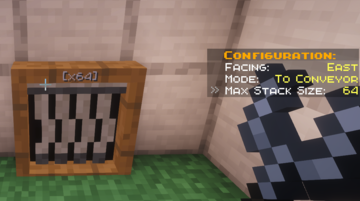 The info screen that pops up when targetting blocks with the Wrench that are configurable.
