PolyFactory:Item Filter: Difference between revisions
Jump to navigation
Jump to search
Hiibastian (talk | contribs) mNo edit summary |
Hiibastian (talk | contribs) No edit summary |
||
| (3 intermediate revisions by the same user not shown) | |||
| Line 7: | Line 7: | ||
}} | }} | ||
An Item Filter is used to whitelist or blacklist items | An Item Filter is a storage and transportation block added by [[PolyFactory]], used to whitelist or blacklist items passing through. | ||
To use it, right click while holding the Item Filter. By default, it is in Whitelist mode, so anything you add to the filter will be the only items allowed to pass through. | To use it, right click while holding the Item Filter. By default, it is in Whitelist mode, so anything you add to the filter will be the only items allowed to pass through. | ||
Once you've applied item(s), you can then right click the Item Filter onto a Hopper, [[PolyFactory:Funnel|Funnel]], or Item Splitter. | Once you've applied item(s), you can then right click the Item Filter onto a Hopper, [[PolyFactory:Funnel|Funnel]], or [[PolyFactory:Item Splitter|Item Splitter]]. | ||
* Can now match up to 9 different items. | |||
* You can change their strictness (full match or type only) and whatever they work as a whitelist or blacklist. | |||
<gallery widths="512" heights="512"> | |||
File:PolyFactory-render of Item Filters placed on blocks in world.png|'''Item Filters for apples rendered placed on blocks: Funnel, Item Splitter, Hopper''' | |||
</gallery> | |||
Latest revision as of 14:45, 1 February 2026
Item Filter

| Renewable |
Yes |
|---|---|
| Stackable |
Yes (64) |
| Tool | |
| Blast resistance | |
| Hardness | |
| Luminous |
? |
| Transparent |
? |
| Flammable |
? |
| Catches fire from Lava |
? |
{
    "title": "Item Filter",
    "rows": [
        {
            "field": "Yes",
            "label": "(link to minecraft:Renewable resource article, displayed as Renewable)"
        },
        {
            "field": "Yes  (64)",
            "label": "Stackable"
        },
        {
            "field": "",
            "label": "Tool"
        },
        {
            "field": "(link to Template:blast resistance values#Missing value article, displayed as ?)(link to Category:Missing blast resistance article, displayed as Category:Missing blast resistance)",
            "label": "(link to minecraft:Explosion#Blast resistance article, displayed as Blast resistance)"
        },
        {
            "field": "(link to Template:hardness values#Missing value article, displayed as ?)(link to Category:Missing hardness article, displayed as Category:Missing hardness)",
            "label": "(link to minecraft:Breaking#Blocks by hardness article, displayed as Hardness)"
        },
        {
            "field": "? (link to Category:Missing luminance article, displayed as Category:Missing luminance)",
            "label": "(link to minecraft:Light article, displayed as Luminous)"
        },
        {
            "field": "? (link to Category:Missing transparency article, displayed as Category:Missing transparency)",
            "label": "(link to minecraft:Opacity article, displayed as Transparent)"
        },
        {
            "field": "?(link to Category:Missing flammability article, displayed as Category:Missing flammability)",
            "label": "(link to minecraft:Flammable article, displayed as Flammable)"
        },
        {
            "field": "?(link to Category:Missing lava susceptibility article, displayed as Category:Missing lava susceptibility)",
            "label": "Catches fire from [https://minecraft.wiki/w/Lava Lava]"
        }
    ],
    "invimages": [],
    "images": [
        "PolyFactory-ItemFilter.png"
    ]
}
An Item Filter is a storage and transportation block added by PolyFactory, used to whitelist or blacklist items passing through.
To use it, right click while holding the Item Filter. By default, it is in Whitelist mode, so anything you add to the filter will be the only items allowed to pass through.
Once you've applied item(s), you can then right click the Item Filter onto a Hopper, Funnel, or Item Splitter.
- Can now match up to 9 different items.
- You can change their strictness (full match or type only) and whatever they work as a whitelist or blacklist.
-
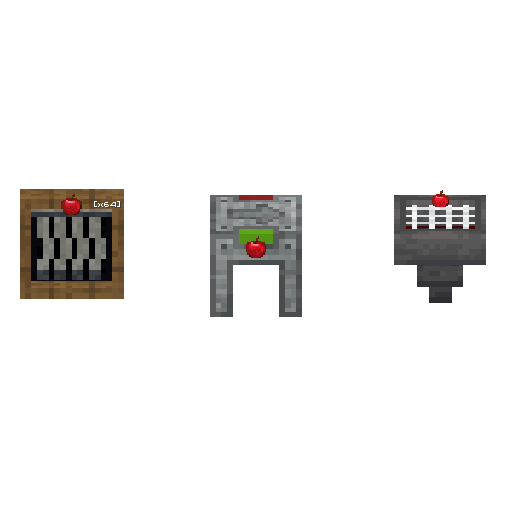 Item Filters for apples rendered placed on blocks: Funnel, Item Splitter, Hopper
