Touhou Little Maid: Difference between revisions
Add brooms section |
m Reword for clarity |
||
| (9 intermediate revisions by the same user not shown) | |||
| Line 1: | Line 1: | ||
{{Infobox mod|title=Touhou Little Maid|image=Touhou Little Maid icon.png|author=TartaricAcid|latest_release=1.5.3 (9 May 2026)|initial_release=1.1.7 (23 February 2024; 2 years ago)|modloader=Forge, NeoForge|minecraft_version=1.16. | {{Infobox mod|title=Touhou Little Maid|image=Touhou Little Maid icon.png|author=TartaricAcid|latest_release=1.5.3 (9 May 2026)|initial_release=1.1.7 (23 February 2024; 2 years ago)|modloader=Forge, NeoForge|minecraft_version=1.16.5–1.21.1|modrinth=https://modrinth.com/mod/touhou-little-maid|curseforge=https://www.curseforge.com/minecraft/mc-mods/touhou-little-maid|discord=https://discord.gg/re4xQtb|sources=https://github.com/TartaricAcid/TouhouLittleMaid|translations=English, Chinese, German, Spanish, French, Indonesian, Italian, Japanese, Korean, Latin, Portuguese, Russian, Turkish, Vietnamese}} | ||
Touhou Little Maid is a mod that adds maids to Minecraft. It is developed for Forge and NeoForge, but an [https://modrinth.com/mod/touhoulittlemaid-orihime unofficial Fabric port] exists. | Touhou Little Maid is a mod that adds maids to Minecraft. It is developed for Forge and NeoForge, but an [https://modrinth.com/mod/touhoulittlemaid-orihime unofficial Fabric port] exists. | ||
The only official player-facing documentation is the in-game ''Memorizable Gensokyo'' book. This page serves as a brief reference and guide, but the in-game book should be consulted for more details. For developers, there is an official Chinese [https://tlmwiki.cfpa.team/ wiki] for extending Touhou Little Maid with Java and KubeJS. | |||
=== Maids === | === Maids === | ||
==== Summoning a maid ==== | |||
Players receive one maid in a ''Soul Spell'' upon first spawn. To summon more maids, obtain 0.5 [[Touhou Little Maid#Power points|power points]] and place these items on an [[#Crafting|altar]]: | |||
* [[File:Lapis_Lazuli.png|20px]] 1x Lapis Lazuli | |||
* [[File:Diamond.png|20px]] 1x Diamond | |||
* [[File:Gold_Ingot.png|20px]] 1x Gold Ingot | |||
* [[File:Redstone.png|20px]] 1x Redstone | |||
* [[File:Iron_Ingot.png|20px]] 1x Iron Ingot | |||
* [[File:Coal.png|20px]] 1x Coal | |||
==== Management GUI ==== | |||
[[File:Touhou Little Maid maid management GUI.png|300x300px]] | |||
Right-clicking a maid opens their management GUI, containing: | |||
* Their inventory | |||
* Skin, schedule, and task selectors | |||
* Health, armor, experience, and affection meters | |||
* Home mode, pickup mode, and entity riding toggles | |||
* Maid and task config pages | |||
==== Modes ==== | ==== Modes ==== | ||
A maid can be in one of | A maid can be in one of twenty-one modes. A maid's owner can switch between modes in the [[Touhou Little Maid#Management GUI|maid's management GUI]]. | ||
{| class="wikitable" | {| class="wikitable" | ||
|+ | |+Maid modes | ||
!Mode | !Mode | ||
!Action | !Action | ||
| Line 120: | Line 142: | ||
|} | |} | ||
==== | ==== Skins ==== | ||
A maid's skin can be changed in its [[Touhou Little Maid#Management GUI|management GUI]]. Naming a maid <code>=>username</code> will set their skin to the Minecraft player with that username. | |||
Custom skins are available through the [[Touhou Little Maid#Management GUI|management GUI]]. A custom skin is only visible to players who have it downloaded. [https://www.blockbench.net/ Blockbench] can be used to create custom skins in the Bedrock Edition model format. | |||
==== Home ==== | |||
When ''home mode'' is toggled, the maid will record its current position and wander within a range around it. The default range is twelve blocks, but this can be changed through the config file. | |||
Using a compass on a maid toggles its home position overlay: | |||
[[File:Touhou Little Maid maid home position.png|300px]] | |||
=== Crafting === | === Crafting === | ||
[[File:Touhou Little Maid altar.png|thumb|A crafting altar]] | [[File:Touhou Little Maid altar.png|thumb|A crafting altar]] | ||
The multi-block altar is the primary crafting interface | The multi-block altar is the primary crafting interface. | ||
Right-clicking on one of the towers places the item in your main hand on that tower. When the items on the towers correspond to an altar crafting recipe and the player has enough [[Touhou Little Maid#Power points|power points]], the output will be placed at the center. | |||
==== Constructing the crafting altar ==== | ==== Constructing the crafting altar ==== | ||
# Craft a ''Hakurei's Gohei'' or ''Sanae's Gohei''. | # Craft a ''Hakurei's Gohei'' or ''Sanae's Gohei''. | ||
# Build this structure:<br />[[File:Touhou_Little_Maid_altar_base.png| | # Build this structure:<br />[[File:Touhou_Little_Maid_altar_base.png|300x300px]] | ||
# Use the Gohei on this block:<br />[[File:Touhou_Little_Maid_altar_base_activation_hint.png|300px]] | # Use the Gohei on this block:<br />[[File:Touhou_Little_Maid_altar_base_activation_hint.png|300px]] | ||
==== Power points [[File:Touhou_Little_Maid_power_point.png|20px]] ==== | |||
Altar crafting recipes require the player to have a certain amount of power points. | |||
Power point bottles emit roughly 0.5 power points when thrown, similar to a Bottle of Enchantment. Power point bottles can be found in naturally generated structures like villages. Maid fairies drop power point bottles when they die. | |||
=== Brooms === | === Brooms === | ||
[[File:Touhou Little Maid maid on a broom.png|thumb|A maid on a broom mid-air]] | [[File:Touhou Little Maid maid on a broom.png|thumb|A maid on a broom mid-air]] | ||
A broom allows | A broom allows a player to fly when a maid sits on it. A broom flies at roughly twice the player's regular movement speed. | ||
==== Crafting a broom ==== | |||
This recipe needs 0.2 [[Touhou Little Maid#Power points|power points]]. On an [[Touhou Little Maid#Crafting|altar]], place: | |||
* [[File:Hay_Bale.png|20px]] 3x Hay Bale | |||
* [[File:Stick.png|20px]] 2x Stick | |||
* [[File:Eye_of_Ender.png|20px]] 1x Eye of Ender | |||
=== | === Aya's Camera === | ||
Aya's Camera allows a player to capture their own maid inside of a photo. Players can right-click a photo to summon a captured maid again. | |||
==== Crafting a camera ==== | |||
This recipe needs 0.2 [[Touhou Little Maid#Power points|power points]]. On an [[Touhou Little Maid#Crafting|altar]], place: | |||
* [[File:Block_of_Quartz.png|20px]] 3x Block of Quartz | |||
* [[File:Obsidian.png|20px]] 2x Obsidian | |||
Latest revision as of 12:33, 27 May 2026

| Author |
TartaricAcid |
|---|---|
| Latest Release |
1.5.3 (9 May 2026) |
| Initial Release |
1.1.7 (23 February 2024; 2 years ago) |
| Mod Loaders |
Forge, NeoForge |
| Minecraft Versions |
1.16.5–1.21.1 |
| Modrinth | |
| CurseForge |
https://www.curseforge.com/minecraft/mc-mods/touhou-little-maid |
| Discord | |
| Sources | |
| Translations |
English, Chinese, German, Spanish, French, Indonesian, Italian, Japanese, Korean, Latin, Portuguese, Russian, Turkish, Vietnamese |
{
    "title": "Touhou Little Maid",
    "rows": [
        {
            "field": "TartaricAcid",
            "label": "Author"
        },
        {
            "field": "1.5.3 (9 May 2026)",
            "label": "Latest Release"
        },
        {
            "field": "1.1.7 (23 February 2024; 2 years ago)",
            "label": "Initial Release"
        },
        {
            "field": "Forge, NeoForge",
            "label": "Mod Loaders"
        },
        {
            "field": "1.16.5–1.21.1",
            "label": "Minecraft Versions"
        },
        {
            "field": "https://modrinth.com/mod/touhou-little-maid",
            "label": "Modrinth"
        },
        {
            "field": "https://www.curseforge.com/minecraft/mc-mods/touhou-little-maid",
            "label": "CurseForge"
        },
        {
            "field": "https://discord.gg/re4xQtb",
            "label": "Discord"
        },
        {
            "field": "https://github.com/TartaricAcid/TouhouLittleMaid",
            "label": "Sources"
        },
        {
            "field": "English, Chinese, German, Spanish, French, Indonesian, Italian, Japanese, Korean, Latin, Portuguese, Russian, Turkish, Vietnamese",
            "label": "Translations"
        }
    ],
    "invimages": [],
    "images": [
        "Touhou Little Maid icon.png"
    ]
}
Touhou Little Maid is a mod that adds maids to Minecraft. It is developed for Forge and NeoForge, but an unofficial Fabric port exists.
The only official player-facing documentation is the in-game Memorizable Gensokyo book. This page serves as a brief reference and guide, but the in-game book should be consulted for more details. For developers, there is an official Chinese wiki for extending Touhou Little Maid with Java and KubeJS.
Maids
Summoning a maid
Players receive one maid in a Soul Spell upon first spawn. To summon more maids, obtain 0.5 power points and place these items on an altar:
 1x Lapis Lazuli
 1x Diamond
 1x Gold Ingot
 1x Redstone
 1x Iron Ingot
 1x Coal


Management GUI

Right-clicking a maid opens their management GUI, containing:
- Their inventory
- Skin, schedule, and task selectors
- Health, armor, experience, and affection meters
- Home mode, pickup mode, and entity riding toggles
- Maid and task config pages
Modes
A maid can be in one of twenty-one modes. A maid's owner can switch between modes in the maid's management GUI.
| Mode | Action | Condition 1 | Condition 2 |
|---|---|---|---|
| Idle | Do nothing | ||
| Attack | Attack hostile mobs with a melee weapon | Main hand holds a melee weapon | Off-hand holds a fire extinguisher (optional) |
| Bow | Attack hostile mobs with a bow | Main hand holds a bow | Inventory contains arrows |
| Crossbow | Attack hostile mobs with a crossbow | Main hand holds a crossbow | Inventory contains arrows or fireworks |
| Danmaku | Attack hostile mobs with a danmaku | Main hand holds a Hakurei's Gohei | |
| Trident | Attack hostile mobs with a trident | Main hand holds a trident | |
| Farm | Plant/harvest crops | ||
| Sugarcane | Plant/harvest sugarcane | ||
| Melon | Harvest melon | Main hand holds a silk touch tool | |
| Cocoa | Plant/harvest cocoa | ||
| Honey | Collect honey from beehives | Inventory contains empty glass bottles to collect honey | Main hand holds shears to collect honeycomb |
| Grass | Remove nearby grass and flowers | ||
| Snow | Remove nearby snow | Main hand holds a shovel to collect snowballs (optional) | |
| Feed | Feed food to the owner when they are hungry | Inventory contains food | |
| Shears | Shear nearby creatures | Main hand holds shears | |
| Milk | Milk nearby cows | Inventory contains an empty bucket | |
| Torch | Place torches in dark areas | Inventory contains torches | |
| Breed | Breed nearby animals | Inventory contains breeding food | Main hand holds a melee weapon to kill excess creatures (optional) |
| Fishing | Sit on a chair and fish | Main hand holds a fishing rod | |
| Extinguishing | Extinguish nearby fires | Main hand holds an extinguisher | |
| Games | Play board games with the owner |
Skins
A maid's skin can be changed in its management GUI. Naming a maid =>username will set their skin to the Minecraft player with that username.
Custom skins are available through the management GUI. A custom skin is only visible to players who have it downloaded. Blockbench can be used to create custom skins in the Bedrock Edition model format.
Home
When home mode is toggled, the maid will record its current position and wander within a range around it. The default range is twelve blocks, but this can be changed through the config file.
Using a compass on a maid toggles its home position overlay:

Crafting

The multi-block altar is the primary crafting interface.
Right-clicking on one of the towers places the item in your main hand on that tower. When the items on the towers correspond to an altar crafting recipe and the player has enough power points, the output will be placed at the center.
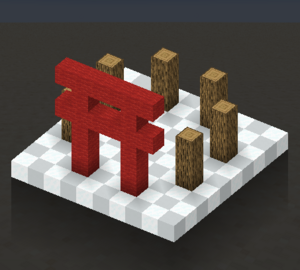
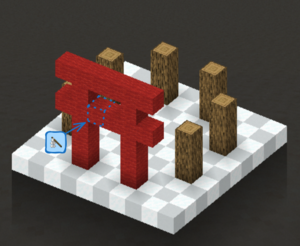
Constructing the crafting altar
- Craft a Hakurei's Gohei or Sanae's Gohei.
- Build this structure:
- Use the Gohei on this block:


Power points 

Altar crafting recipes require the player to have a certain amount of power points.
Power point bottles emit roughly 0.5 power points when thrown, similar to a Bottle of Enchantment. Power point bottles can be found in naturally generated structures like villages. Maid fairies drop power point bottles when they die.
Brooms

A broom allows a player to fly when a maid sits on it. A broom flies at roughly twice the player's regular movement speed.
Crafting a broom
This recipe needs 0.2 power points. On an altar, place:
 3x Hay Bale
 2x Stick
 1x Eye of Ender
_JE2_BE2.png)


Aya's Camera
Aya's Camera allows a player to capture their own maid inside of a photo. Players can right-click a photo to summon a captured maid again.
Crafting a camera
This recipe needs 0.2 power points. On an altar, place:
 3x Block of Quartz
 2x Obsidian

