PolyFactory:Item Splitter: Difference between revisions
Jump to navigation
Jump to search
Hiibastian (talk | contribs) Re-uploaded better quality image of example usage |
Hiibastian (talk | contribs) m fixed typo |
||
| (4 intermediate revisions by the same user not shown) | |||
| Line 1: | Line 1: | ||
{{Infobox block | {{Infobox block | ||
| title = Item Splitter | |||
| image = PolyFactory-Item Splitter.png | | image = PolyFactory-Item Splitter.png | ||
| renewable = Yes | | renewable = Yes | ||
| Line 5: | Line 6: | ||
| maxStack = 64 | | maxStack = 64 | ||
}} | }} | ||
[[File:PolyFactory-Item Splitter Example.png| | The Item Splitter is a transportation block added by [[PolyFactory]]. It is used to split the transportation of items on an [[PolyFactory:Item Conveyor|Item Conveyor]] or [[PolyFactory:Sticky Item Conveyor|Sticky Item Conveyor]]. On the left and right side, [[PolyFactory:Item Filter|Item Filters]] can be placed to control split.<gallery mode="nolines" widths="240"> | ||
File:PolyFactory-Item Splitter Example.png|An Item Splitter is used here to split different seeds from the Item Filters placed on the left and right sides. Meanwhile, anything else (in this case regular Wheat Seeds) are coming out the front where the arrow points. | |||
</gallery> | |||
Latest revision as of 02:32, 31 January 2026
Item Splitter

| Renewable |
Yes |
|---|---|
| Stackable |
Yes (64) |
| Tool | |
| Blast resistance | |
| Hardness | |
| Luminous |
? |
| Transparent |
? |
| Flammable |
? |
| Catches fire from Lava |
? |
{
    "title": "Item Splitter",
    "rows": [
        {
            "field": "Yes",
            "label": "(link to minecraft:Renewable resource article, displayed as Renewable)"
        },
        {
            "field": "Yes  (64)",
            "label": "Stackable"
        },
        {
            "field": "",
            "label": "Tool"
        },
        {
            "field": "(link to Template:blast resistance values#Missing value article, displayed as ?)(link to Category:Missing blast resistance article, displayed as Category:Missing blast resistance)",
            "label": "(link to minecraft:Explosion#Blast resistance article, displayed as Blast resistance)"
        },
        {
            "field": "(link to Template:hardness values#Missing value article, displayed as ?)(link to Category:Missing hardness article, displayed as Category:Missing hardness)",
            "label": "(link to minecraft:Breaking#Blocks by hardness article, displayed as Hardness)"
        },
        {
            "field": "? (link to Category:Missing luminance article, displayed as Category:Missing luminance)",
            "label": "(link to minecraft:Light article, displayed as Luminous)"
        },
        {
            "field": "? (link to Category:Missing transparency article, displayed as Category:Missing transparency)",
            "label": "(link to minecraft:Opacity article, displayed as Transparent)"
        },
        {
            "field": "?(link to Category:Missing flammability article, displayed as Category:Missing flammability)",
            "label": "(link to minecraft:Flammable article, displayed as Flammable)"
        },
        {
            "field": "?(link to Category:Missing lava susceptibility article, displayed as Category:Missing lava susceptibility)",
            "label": "Catches fire from [https://minecraft.wiki/w/Lava Lava]"
        }
    ],
    "invimages": [],
    "images": [
        "PolyFactory-Item Splitter.png"
    ]
}
The Item Splitter is a transportation block added by PolyFactory. It is used to split the transportation of items on an Item Conveyor or Sticky Item Conveyor. On the left and right side, Item Filters can be placed to control split.
-
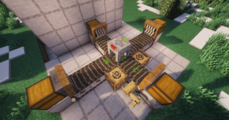 An Item Splitter is used here to split different seeds from the Item Filters placed on the left and right sides. Meanwhile, anything else (in this case regular Wheat Seeds) are coming out the front where the arrow points.
